It’s been a few months since the last post. After we added bombs into the game, we started designing some dungeons on graph paper. However, we quickly realized that without having special weapons locked down, we really couldn’t design dungeons because we might accidentally make them obsolete. This is because special weapons serve as “keys” to “locked doors” in dungeons. For example, perhaps a weak wall stands in the way of the player. Using a bomb to blow up that said wall is the “key” to “locked” wall.
We had two goals in mind when coming up with these special weapons:
Thus, we began the adventure of brainstorming what special items (as well as other special armor / gear) the hero can collect along the way.
Bomb Gloves
Last time we mentioned we had created WIP Bombs. We’ve polished bombs a little more, and even added gloves to the hero, so the player knows when they’ve equipped the Bomb Gloves. Bombs will obviously break through weak walls, as well as deal heavy damage to enemies.
Bomb Gloves
Light Rod
The Light Rod will be the final rod of suite. Currently Fire, Water and Ice Rods have multiple varieties, as well as derank during use. However, the Light Rod will not derank, and there is only one Light Rod. It took us a while to come up with how light can damage an enemy. Then one day, it hit me as I was driving and I could barely see with the sun in my eyes — what if being blinded was a game mechanic? Thus, the Light Rod casts a beam of light that can stun an enemy instantly if the beam hits the enemy in the face, as well as deal 20 damage. Originally, we were going to blind the enemy either temporarily or permanently. However, this felt too overpowered because the enemy would roam around aimlessly, making them too easy to kill. Therefore, we went with the stunning the enemy for a good amount of time approach.
Light Rod
The Light Rod will also shine light in dark areas, clear dark energy, and turn stone into rubble. Beams can also be reflected off of certain surfaces.
Boomerang (Working Name)
We thought it would be cool if we could have a weapon where we draw its path. After playing around with it a bit, we finally had something that seemed to work well in the engine. Currently we are using a boomerang to represent the object — but this will change as the game and story gets refined.
Boomerang Draw
When the player presses the attack button, time stops and they are able to draw a line that the boomerang will follow. Lines can’t flip, but can be drawn for a certain amount of time. The end point will eventually move faster and faster and fade once time is about to expire for drawing. After the line is drawn, the camera is moved back to the hero and the boomerang is thrown.
Boomerang Throw
If the boomerang hits a wall or reaches the end of its path, it will navigate back to the player. Currently, the boomerang automatically stuns enemies for a small amount of time, as well as deals 10 damage. The boomerang will also hit switches that a straight shot (e.g. a bow and arrow) would not normally hit if a wall is in the way, because the player can draw a path around the obstacle.
Grappling Hook (Working Name)
The Grappling Hook is the hookshot equivalent in Violet. If an enemy is far away, the Grappling Hook can be used to bring enemies closer to the hero. If the enemy is much bigger than the hero (e.g. Centaur), the hero will actually be projected towards the enemy. Enemies caught in the hook will also be dealt 10 damage, as well as stunned for a small amount of time.
Grappling Hook
The Grappling Hook can also be used to reach areas not normally reachable on foot by the hero. The Grappling Hook can be thrown and latched on certain surfaces that the hero can then be projected towards.
Orb Shooter (Working Name)
The Orb Shooter is very unique in that it doesn’t deal damage, but acts as a defensive mechanism for the hero. If the Y button is pressed, an orb will be shot towards the target. However, if the Y button is held down, orbs will begin to surround the player, acting as a defense. If so many orbs hit an enemy, the enemy will be stunned. If an attacking enemy hits the hero when surround by orbs, the hero will take no damage and an orb will dissolve. Orbs that are shot cannot protect the hero. If the player releases a held Y button, all of the orbs that were surrounding the player will be shot towards the target.
Orb Shooter
The orb shooter can also be used to trek harsh surfaces because the orbs act as a barrier for the hero.
Conclusion
It’s taken a while to not only figure out what these special weapons were going to be, but how they function in the game. Much of these are still early in the design phase and will probably get major adjustments to them. We’ll also want to make sure they are balanced well with the rest of the game. Since we have a good system in place, it shouldn’t take two years to get these polished like the rest of the engine. 😉
Part of creating a game requires developing tools and other functions that don’t necessarily effect the player, but help in the process of making the game. These tools can be range from art assets, such as this sprite generator from https://github.com/makrohn/Universal-LPC-spritesheet, or these utility functions from https://github.com/gmlscripts/scripts. Either way, in creating Violet, we have borrowed so much from the help of others, that we decided to contribute some of our own works. After all, we would not be as far as we are today without the help of the community. So, we hope that this post, and these “few lines of code” will help make someone else’s project go from dream to reality.
Draw Container is a layout text engine we developed for Violet with Game Maker Studio 2. Instead of managing ever-changing positions and sizes of the draw_text routines, we manage containers and their layout type. Draw Container uses concepts similar to CSS Layout and Relative Layout.
Perhaps we need to draw some text to the screen. Or perhaps we need to draw an advanced GUI. Draw Container has been a huge help with the development in Violet. We introduced a simple version of it on the Day 32 post. However, that version quickly became obsolete as we need to render sprites and nested text. With Draw Container, we can draw extensive GUI’s, character dialog, HUD elements and much more!
Let’s look at an example:
Draw Container Example
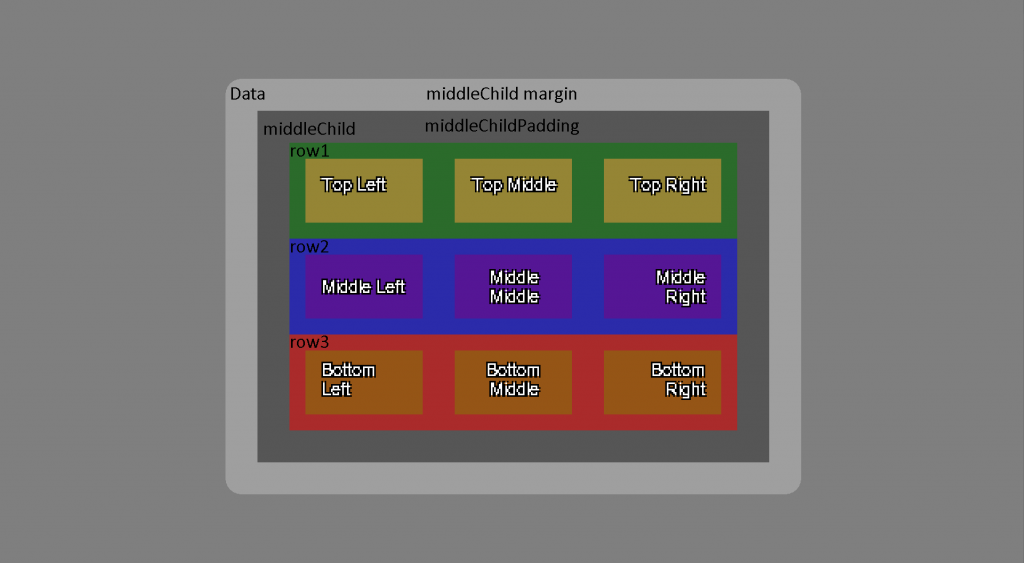
We can see that draw_container renders a root container called data. data has a size of 360x260, with a background color of light gray and is rendered in the middle of the screen. It has a child container called middleChild, with a background color of modern black, a margin of 20px and a padding of 20px. middleChild has three children called cols with a grid layout of column. This means that col's children will render by being “stacked” on each other. The first child of cols is called row1. row1 tells its children to render their sizes equally by using a property called flow and setting it to split. Each child in row1 has a margin of 10px and a padding of 10px. The other two children of cols, row2 and row3 and their cihldren are very similar to row1. and it’s children.
There are plenty of other examples provided in the repo link above, as well as a more in-depth look on all the available properties and how they behave with one another. Hopefully creating text-based UI will become a much more manageable with draw_container in Game Maker Studio 2.
GMS Tasks adds some command line tasks for repetitive actions for Game Maker Studio 2. Current tasks include merging instances in several rooms into one room, stitching a world map from images, exporting all sprites from your project to sprite strips, making Game Maker sprites (yy files) from strip files.
Some of these tasks, such as merging instances from several rooms into one room might be pretty niche to Violet with how we are developing our open world. However, there might be other tasks in here that would be of benefit.
GMS Tasks currently has six tasks available:
Build
The purpose of the build command is to take instances in several rooms and copy / paste them into the “main” room.
Let’s say we are building an open world game in Game Maker Studio 2. We’ve found that after a while, using the room editor with thousands of instances makes the room editor slow and unusable. Our solution was to create “copies” of each room, in their full size, and only work on a section for each room. Then, when it comes time to “test” the game in the “main” room, we can run our script to merge these instances into the one room.
Clean
The purpose of the clean command is “clean” the main room from the build command — essentially reverting the main room to its former state.
Generate Map
The purpose of the generate-map command is generate (stitch) a map image from a open world game in Game Maker Studio 2. In Violet, we are currently export all the things we want on our map to an image file, and then render that image file for the “map”. This script will take images generated from Game Maker Studio 2, and stitch them together into a map.png file.
Export GM Sprites As Strips
The purpose of the export-gm-sprites-as-strips command is to take all sprites in a Game Maker Studio 2 project and export them as strips. This can be very useful if we need to export are sprites as strippng files for an artist.
Make GM Sprites From Strips
The purpose of the make-gm-sprites-from-strips command is to take (very many) strip images and import them into Game Maker very quickly. For example, let’s say we generated many characters from https://github.com/makrohn/Universal-LPC-spritesheet To import each individual row into Game Maker for many strips is very time consuming. This task will speed up that process.
Snap
The purpose of the snap command is take all instances from specified rooms snap them to a grid. Sometimes when copying / pasting large volumes of instances in the room editor, the grouping does not conform to the instance grid it was copied into. This command will run and ensure all instances are placed correctly on a grid.
I didn’t realize how long it had been since the last post. It felt like we hadn’t done too much that was worth sharing. However, after looking back at the commit history, there’s a lot of cool things to talk about. So here we go!
We were planning on adding special weapons to the game, besides the balanced / agile / heavy / rods that we already have. These weapons will be obtainable by progressing through particular dungeons. Without spoiling too much on the “special” mechanics of the bomb, we wanted to at least explain the direction we were thinking of the bomb.
Bomb (Original art by IndigoFenix)
Unlike bombs in Zelda games, bombs in Violet will be on the heavier side. Picking up and throwing bombs will take some time to do. However, if you can land an attack with a bomb, it currently deals 150 damage (7.5 hearts)! That is the equivalent of a S ranked Heavy weapon’s damage output! The blast will disperse those that collide with the bomb at high speeds. The closer you are to the blast zone, the faster you’ll move! The blast of the bomb also stuns, There’s a bit of risk using the bomb, but there’s a good amount of reward, as well as a ton of fun to pull off landing the explosion!
Added Animations
Not to be confused with “good” animations. This simply means we added some animations to things in the game there were originally instantaneous. The aforementioned picking up and throwing now has animation. Objects with little weight will be quick to pickup and throw, while objects with heavier weight will be slower to pickup and throw. We didn’t want to be obnoxious with the speeds, so they’re still pretty generous. It does give a little more risk to picking up and throwing things, however. Once the action has started, it can’t be canceled (unlike other actions in the game).
Pickup Animation
The other animation we added was removing arrows from enemies. Again, this used to be instantaneous, which made shooting arrows in your enemy, then removing them immediately pretty OP. However, with an animation, there’s a little more risk involved in removing arrows from your enemy. We didn’t want there to be no reward (other than getting your arrow back) — so we improved upon the “stuck arrows” mechanic (special thanks to a friend for these ideas).
Remove Arrow Animation
Improved Arrow Mechanics
Along with the animation that we implemented, there are three new risk / reward mechanics to “stuck arrows”:
Originally, each arrow stuck in an enemy would deal 2 damage per second per arrow. There was no cap, which would make fighting Centaurs, for example, really easy to defeat by shooting, say 30 arrows, and then waiting for it to bleed out. Now there’s cap at 5 arrows. The player can still of course “abuse” this mechanic by waiting the enemy out — and that is fine with us! Because…
Each arrow in an enemy will make them attack faster (capped at 5 as well). Arrows in an enemy will result in them getting more aggressive as they bleed out. Too many arrows in your enemy at once will also make it harder to remove them as well, because you’re enemy will be attacking much faster.
The reward though for removing an arrow from an enemy is that it will deal 1.5 times the damage coming out than it did going in. So, if you shot the arrow with a bow that deals 30 damage, it will be removed at a damage of 45. Not too shabby!
We also fixed an issue where fire arrows getting unloaded would leave behind the particle of fire. After thinking about it for a while, the easy fix ended up being if an arrow collides with the unloaded zone, instead of unloading the arrow and trying to properly remove the fire particle, the arrow could “break” and we no longer have to keep track of the arrow or the fire, because a breaking arrow destroys itself and properly “puts out” the fire object.
Improved Shield Mechanics
One thing I’ve been struggling with for a while is “what’s the point of leveling up a shield”? Originally, there was no advantage in having weaker types of shields. So, it would be to the player’s benefit to ignore the Wooden Shield, since they are the weakest, and simply go for the more powerful shields. However, we improved on the shield mechanics below:
If a shield type is overall weaker in power (e.g. Wood Shield), it is also lighter to carry. However, if a shield type is overall more powerful (e.g. White Shield), the slower the player will move as they are holding the shield.
We were originally mimicking Breath of the Wild‘s “weapon hitting shield mechanic” pretty closely, in that an agile weapon could still hit a shield a few times to eventually knock an opponent down. We ended up redefining this to be:
If the attack power of a shield is greater than the weapon attacking it, the holder of the weapon attacking will automatically stun.
Heavy weapons hitting a shield still apply though, where the holder of a shield will be stunned.
But, if the shield happens to be greater attack power than the heavy weapon’s damage, then both parties will be stunned.
Parrying or reflecting no longer damages the shield to rank down.
Leveling up your shield is important now, because weaker weapons attacking it will be vulnerable to your strengthen shield. It also makes agile weapons a terrible choice for fighting against enemies with a shield due to its lighter damage output (because of its faster attack repetition).
Power Shield
Updated Zoning
This part is a little more technical. So if that is not your thing, skip to the next section 😛. Game Maker Studio 2 (GMS2) gives the developer the ability to activate / deactivate objects. Objects that are deactivated are still in memory and can be turned on easily, but will not be processed each frame of the game. This is how we are able to make the open world part work is by only activating objects we need and unloading them when we don’t.
However, GMS2 unfortunately gives us no control over when an object is being activated or being deactivated. This is important because let’s say we have a fire arrow we shot and it’s burning. Normally a fire arrow will burn up in 10 seconds. Let’s say we “unload” the fire arrow by going somewhere and then a minute later we come back to the area where the fire arrow is at. Currently, the fire arrow will still be burning. If GMS2 had an event to say “hey, this fire arrow just came back into play, let’s do something about that”, we could say if the fire arrow has been around for more than 10 seconds, we automatically destroy it after reactivating it, since it would have burnt up by then.
I submitted a feature request to the Game Maker that simply was replied back with “we have plans on adding this, but have no time frame on when that will be complete”. With this reply, we decided to roll out our own event system. It’s pretty simple, really. Basically, we have a wrapper function that before it calls GMS2 activation / deactivation routines, we run our event that should “do something” when an instance activates / deactivates. We’re currently using the path_ended event, since we aren’t using GMS2 built in path variables, and therefore, it’s a free and open event to use. So, if an object gets activated or deactivated, it will run the event with a string saying what kind of activation it is. We have these constants:
fullyActivated – an instance is fully activated and collisions will work activated – when an instance is about to be activated. activatedFromPlacholder – when an instance is about to be activated because we are coming from a dialog state activatedFromPause – when an instance is about to be activated because we are coming from a pause state deactivated – when an instance is about to be deactivated deactivatedFromPlacholder – when an instance is about to be deactivated because we are going to a dialog state deactivatedFromPause – when an instance is about to be deactivated because we are going to a pause state
Even though this took quite a bit of reworking, it’s now faster than before, as well as giving us more control and flexibility down the road when we add a more robust layering system (think floors in dungeons).
Waterfall
Waterfall
We’ve been needing to add a waterfall for a while now. With the updated zone loading, this had some interesting side effects. The way the game loads in areas is by what we call zones. The game will load the area the player is in, plus a few surrounding zones outside the camera to make things not “pop in”. The original rule was all objects could be no bigger than a zone width and height. This was followed until now, wanting to make a waterfall, since the height of them are larger than one zone height. So, we had to rework how the loader was working to account for larger than zone objects.
The other problem we encountered was an object has two “boxes”: a hitbox and essentially what you see box (the image). For example, the hero has a 32×32 sprite, or rather, the box the image lives in. However, we don’t want collisions to be the entire image which is what the “hitbox” represents. The problem was a function we were using to see what things to “unload” was using hitboxes instead of the actual image. For loading / unloading, we actually want to use the image box, not the collision box. We can see with our debug camera enabled how even though there are four zones loaded, there are a few objects that are on the borders of those zones that are actually loaded as well. That way we don’t get a weird “pop in/out” effect as things get loaded / unloaded.
Object in Zones Debug Camera
Other Notable Features and Fixes in the Past Month
Enemies using weapons will not degrade anymore. Originally it was intentional that enemies weapons degraded. However, with the new merging system, it seemed weird to pickup a dropped weapon of an enemy only for it to degrade after using it few times.
Lost weapons get picked up by the store. If the player drops a weapon or kills an enemy and doesn’t pick up their weapon, eventually these weapons get “picked up” by the shop keeper. Another reason why it was so important to be able to run our activation events is when these weapons get unloaded, that’s when we decide if it should go back to a shop or not. When returned to the shop, weapons that can be merged will be automatically merged and are able to be bartered. This is an interesting mechanic because weapon merging shops also become bartering shops with potentially better weapons for the player.
Weapons Back to Store
Attacking with Elemental Rods. Fire, Water and Ice Rods originally had no collision on them and the only way to attack with rods was with the projectile they shot. We added collision on these rods. However, elemental rods are not meant to be used as melee weapons. As a consequence, if the player attacks with rod, it will drop in rank immediately.
Updated enemy chasing logic. Originally as soon as enemy was hit, all enemies nearby would “magically” be triggered to the chasing state as well. Now, enemies will look in the direction of the enemy in danger and determine what to do next. Also, if an enemy is chasing, and another enemy notices their friend chasing, they’ll look in their direction to see if they should chase too.
There were two new big features developed in this past month. The first, we are tentatively calling Draw Container (which was an overhaul to the text box system described in the post Day 32), is more technical in nature. Thus, I am going to do a separate post very soon about the feature because we want to open source this code for others in the Game Maker community to use.
The second, less technical feature built this month was adding a more interactive map that the player can use:
Better Map
Though this map has been in the game for some time, there was no interacting with it. We’ve now added a couple features to make the map more usable:
The player can now fast travel. The feature will probably mature over time. But at this point, blue dots on the map are points we can travel to. There’s no animation currently, as the way we’ve built the engine, no loading time is required. However, instantly moving feels a little jarring and will probably add something to make it feel right. If the player fast travels, they leave behind a point in which they can fast travel back to. This is great, for example, taking advantage of bringing found weapons back to the shop to get weapons upgraded, and then, returning back to where we were just at.
Green dots show locations of interest. One thing we noticed when people first started playing was trying to figure out where things were at. Granted, having signs on the trails, or signs on the houses would help (which we are planning on adding). But we thought it would be helpful to add these points on the map.
Yellow dots show points of interest and Red dots are the main objective. In the tutorial, one of the characters tells the hero that yellow dots on the map should be visited, while the red dots are the objective. Eventually we can get all fancy with how we color and display these dots — but the ability to have objective markers show up / disappear on maps exist even better now.
The player can zoom / pan the map. We’ve all used Google Maps, we expect some sort of panning and zooming these days. Thus, the ability to zoom and pan the map exists. If the map is all the way zoomed out, the cursor will simply move without being in the center of the screen. Otherwise, if we are zoomed in enough, we’ll keep the cursor in the center until we are approaching the edge of the map. There’s a little bit of polishing still to be done on this, but overall, it works pretty good.
Other Notable Features and Fixes in the Past Month
In this past month, I’ve had a few co-workers and friends play the game either for the first time ever, or the first time since April of last year. It was exciting to see them play and to gather their feedback. Though we were planning on doing a map eventually, we decided to act on the feedback and add some kind of workable map now. Anyway, here are the those items:
Dpad UI Update. It was unclear which item was equipped at the top of the screen. We were programmatically highlighting the color of the weapon. However, gray and yellow don’t mix well, which many “metal weapons” are colored in gray. An awesome suggestion from one of my co-workers was to simply highlight the Dpad direction that was equipped. Simple enough, easy to understand. This might change as graphics and UI get updated, but for now, simple enough solution to a bad UX.
Dpad UI
Interacting with Objects — Specifically Doors. Out of the same playthrough came another annoying issue. Many objects, especially doors, expect the player to be facing the object (mainly how the hitboxes are working behind the scenes). The problem that was occurring was players would get close to the door, but when a collision happens, to make the hero “slide” against walls, a new vector gets determine, which causes the player to face a different direction. Therefore, running into a door on a slight angle would force the hero to face a different direction, making it annoying to open a door because they were no longer facing it. This has now been polished and fixed.
Better Algorithm for Enemy’s Weapon Rank. Last month we talked about how we were randomizing enemy’s weapon and their rank. One issue I was noticing was if we didn’t have a certain weapon, and we ran into an enemy that was supposed to be “strong”, the weapon would still rank to the worst ranking. We ended up updating the algorithm to account for weapons the player doesn’t have, or has low ranking of, relative to what an enemy should be ranked at.
Moved the Initial Chest House, Shop and Dojo. One of the NPCs currently say in the demo “A weapon? Tell you what. I have a few chests in my shop right over there. You’re welcome to take what is in them.” Currently on the screen at the time is a house. So naturally players went into that house — only to find out that it was the Dojo. We ended up moving around these houses / shops so that it felt a little more natural based on how players were initially moving.
House Arrangement
Knocking Enemies Off of Cliffs if they’re Stunned. This has been something I’ve wanted to add for a while. Now, if the player or an enemy get stunned, and their force is in the direction of a cliff, they will fall down the cliff and take damage.
Falling Off Cliff
Added a Temperature Gauge. For a while, we’ve had the weather in the bottom right corner of the HUD. However, we can easily tell what the weather is based on visuals — like seeing rain or clouds. We decided to add a gauge that shows whether the player is getting hot or cold.
This past month or so has seen quite a few additions to the game. The most notable feature was letting the player choose which items they want to barter. A lot of refactoring had to happen to make being able to choose what to barter work. Before, only five distinct pause states were allowed — menuing, item, dialog, map and death. The reason these were distinct was because the player could only be in one at a time, without overlap. For example, when we pressed start to pause the game to go into menuing, we did so from the game state. If we wanted to get back to the game, we’d unpause and be back into the game state. If we were talking, it was because we did so from the game state.
A dilemma started to arise though as we began working on bartering. So far, there was no need to account for dialog state to menuing state, then back to dialog state. But now, if the player decided they wanted to choose what to barter, we were not coming from the game state, but rather, from a dialog state. Because of this new complexity, we needed to rewrite the way pausing was working so that it was using stacks instead of a simple boolean toggle.
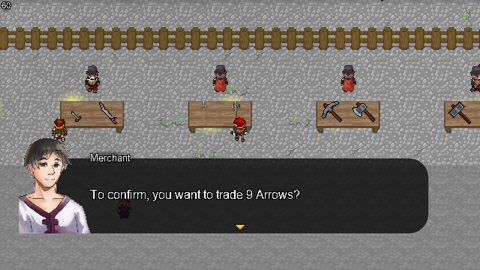
Bartering Confirm
With this out of the way, we also need a way to input “how many” of a thing we wanted to barter. For example, if we have 15 arrows, perhaps we only want to barter 5 of them. We needed to give the player a way to input this number. Therefore, we added a simple numeric up/down menu item. To make it easier for the player, instead of pressing left or right for each decrease/increase of the input, we can simply hold down the direction. Holding down the direction yields bigger increments / decrements for the input.
Numeric Up/Down
Practically Speaking
Enough CS talk. What does mean for the game? So far my initial thoughts are that it’s a bit tedious to get the item / weapon we want. One thing that we didn’t mention yet is though the NPC still chooses randomly what to barter, they remember what they’ve already chosen, so the automatic part seems to be working well and is less tedious. However, as soon as the player wants to choose, currently, we throw away that data. To make this less tedious and more fun / playable, if the NPC does not like what the player chose, instead of randomly picking again, the NPC should center its “counter offer” around what the player chose, as well as factoring in what has been denied up to that point. I think there’s still potential here, but it needs to “just work” in order for it to “feel right”.
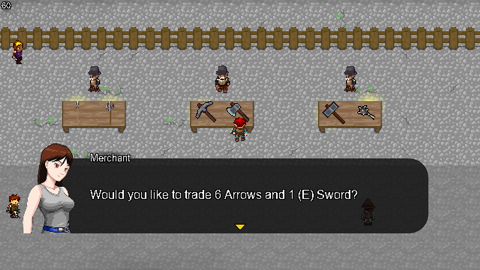
Bartering Counter
Other Notable Features and Fixes in the Past Month
Most of the features / fixes centered around bartering. However, with the holiday season, we were able to demo the game to a few friends and family members who haven’t seen the game in almost a year! Therefore, we were able to take some really good notes — many centering around very simple stuff, like, how to play the game! Therefore, we’ve begun to double down on adding more “tutorialy” things. Here’s the list:
Since a lot of the NPCs are placeholder and otherwise, doing nothing, we decided to give them some dialog. Currently, that dialog is simple “how to play” things, as well as simple to in-depth mechanics of the game.
There’s now a Dojo that teaches the player simple fighting mechanics. This is not required for the player, but should be useful for those playing it for the first time.
Dojo
Whenever a player picks up an item or weapon for the first time, a quick message appears explaining how to use the weapon and showing which button to press.
Use Weapon Tutorial
Many people who have played The Legend of Zelda: A Link to the Past know that Link can jump off cliffs. The same can be done in Violet. However, many people who have played the game don’t realize they can do so. Therefore, when the player gets near a ledge, a simple, non-interrupting pop up appears.
Jump Tutorial
We added WIP doors! There is no animation for the hero currently, so he just uses the jumping animation. It’s kind of goofy!
Though placedholder, and repetitive (meaning we don’t have unique portraits for ALL NPCs), we’ve added some more NPC portraits in the game. I found while testing bartering for the fifteenth hundred time that we should get a few more portraits in the game. I simply imported portrait graphics from PlayCraft and ZeNeRIA29.
NPC Portrait
We’ve added a few more balanced weapons: Rapier, Saber and Dagger. The Rapier has a little more durability than other balanced weapons. The Saber has less durability, but is a tad stronger. The Dagger‘s range is extremely small. However, a sneak kill in the game for any weapon yields 10x the damage output for a weapon, where a dagger has a 20x multiplier.
We’ve added a few more bows: Recurve Bow and Great Bow. With all bows before, if something was moving, and a bow and arrow (or any projectile, really) was shot, it may miss the target, because the direction was computed based on where the target was at, not where it was going. Therefore, we are now accounting for that, sort of. What we mean by that is for a Recurve Bow, it is 90% accurate when shooting at a moving target. We take the “where it’s going part” and use a .9 multiplayer. If an enemy is moving really fast, the player may still miss it. The Standard Bow has a .4 multiplier on it. These multipliers hopefully gives “uniqueness” to each bow. If the player is moving while shooting, the multiplier is even less! It’s best to shoot at a moving target when the hero is standing still. Oh! And the Great Bow can shoot three arrows at once!
Recurve Bow
Lastly, all the Soldier enemies now carry weapons randomly, based on their type. For example, an OrcBalanced would randomly choose between a Sword, Rapier, Saber and a Dagger. Not only are there weapons randomized, but now their ranking is relative to the player’s ranking. For example, if a player is carrying a D rank sword, the OrcBalanced can rank up to D as well. There is a cap for easier enemies, and less of a cap for harder enemies. That way, player is not farming high ranked weapons off of easy Soldier enemies.
An idea I have had early on is bartering in a game. Most games, and even real life, have some kind of currency where one can buy goods and services. Money is really just a form of agreed upon currency that society has determined. But in reality, the value of money is just made up. When someone spends money, one is buying into the value of the good or service, relative to their own wants or needs. For example, a $300 Nintendo Switch, which I think is “awesome”, is “worthless” to my Grandma; there is no value of a Switch for her. So if we really think about it, we’re all just bartering goods and services with a standard exchange rate. Therefore, early on in the game’s development, I thought “what if there was no established currency? What kind of ‘new’ game mechanics could come out of it?”
In Violet, maybe a player perceives the agile weapons as superior, while another player likes the mechanics of the element rods better. Instead of the game (e.g. the developer, me) determining what an item or object is worth, we’ll let the player decide.
Bartering
In all economic systems, all goods and services have some kind of “value”, or mathematically, a number associated with it. The game will still attach a “perceived value” to each item in the game as a starting point. But with a bartering system, those you are trading with in the game can fluctuate that value. Maybe firewood is “more valuable” in the cold mountains, where as “ice cream” is more valuable in the tropical region. Or perhaps a NPC really likes apples, while another really likes balanced weapons.
We believe this could be an interesting mechanic for two reasons:
For those like me, who do not normally talk to NPCs in games, now have a reason to interact with them. The more you get to know someone, the more you get to know their likes and dislikes. If a particular NPC has a sword, and you know they love apples, the player can be advantageous and trade their unnecessary apples for a new sword.
The “collectathon” element of the game becomes more valuable, because anything could become currency. The player may stumble upon some junk that may end up being someone else’s treasure.
One drawback is it could be tedious for the player to get goods and services in Violet. One way we’ve remedied that is by having the NPC automatically go through your inventory and choose what to trade. Right now it’s at random, but could easily be improved upon by adding some intelligence, such as not rechoosing something the player already rejected, or being biased based on the NPC’s preferences.
The other drawback is that there isn’t that one established collecting item (currency) that players will drive towards. For example, there isn’t a concept of rewarding the player with “money” because, there is no money. Getting the “collectathon” element of the game right becomes extremely important.
Right now, bartering is just in a proof-of-concept. But so far, we really like the direction of where this mechanic is going. We are excited to see how this feature gets better over time.
Other Notable Features and Fixes in the Past Month
This past month was more of a refactoring and cleaning up TODOs month. I hadn’t really gone through and cleaned up anything since the beginning of the year, and there were definitely a big list of things needing cleaned up. However, there was a few new notable features as well. Here’s the list:
Abstracted “Menuing” for NPCs, Pause Menu, etc.
If we are going to be able to barter, we need to be able to menu. We abstracted the menuing system from the pause menu and made it is own thing that can be used anywhere. This means NPCs are now able to respond to input from the player.
Added “Eat to Full Health”.
Instead of rapid fire eating a one heart healing item, we’ve add the ability to “eat to full health”, which allows the user to menu once and eat as many of an item that is needed to be at “full health.”
Began adding a new area — the intersection between forest and grasslands.
Added $ to hold text injection for dynamic text for NPCs.
For example, the translation file has “Would you like to trade $?” and we can inject dynamic text into the $ placeholder (read “Would you like to trade 10 arrows?”).
If a soldier enemy continues to get stunned, they will immediately attack hero.
This prevents the player from taking complete advantage of a stunned soldier type enemy. We may abstract this out to only certain soldier type enemies in the future.
Infinite clouds during paused fixed
When you pause a game, you’re not really pausing the game, but rather “deactivating” things. Apparently, I did not deactivate the controller that generates clouds when paused. But, we were deactivating the controller that despawns clouds. Thus, keeping the pause screen on for too long caused resuming the game to be pretty foggy.
Fire spreads correctly again.
Temperature with fire was incorrect when there was fire loaded.
Even if the player wasn’t near fire, the player was “warmed up” as if they were.
Many TODOs completed / patched as well as other optimizations.
As mentioned, this was a big month of refactoring and clean up. Hopefully we’ll have better foundation to continue building new features upon.
The game is not dead! The radio silence the past few months was not a sign of defeat, but rather, a sign of reevaluating the direction of the game, as well as determining next steps. Back in May, I decided to meet with an adviser to figure out marketing, as well as getting an overall impression of the game. After sitting down and writing a vision document, then, having the document get beat up over the course of a couple months, a new and exciting direction for the game was born.
New Updates and Direction
One of the major outcomes from this was deciding on the right resolution. In an earlier post, we were struggling on finding that right resolution. We’ve decided on a resolution that will scale well, as well as readjusting the camera’s position for better gameplay experience. This however means all of the artwork previously done will have to be recreated. Much of the original art, especially character and enemy art were placeholder anyway, so this is not as drastic as it sounds.
Another new direction for the game was to polish the combat mechanics a bit more. We revamped the stamina system, as well as introducing a new weapons merging mechanic. This mechanic will implement a fun collection-to-merging mechanic, as well as streamline the way menuing currently works.
There are also major changes to the story. We haven’t revealed much of the story so far, but the direction we are taking will make the gameplay and experience more cohesive. Violets and their purpose have been completely redesigned as evident with the new logo:
There have been lots of other major updates to the game since the last post as well. Here are some other high level bullet points of those changes:
Fixed memory leak to maintain 60 FPS
Tweaks to enemy AI to adjust for smaller viewport
Update horse movement
Heat transfer — aka arrows can catch on fire for “fire arrows”
Revamped the temperature system — fire in cold areas will keep the player warm
WIP Castle Town
New NPCs as well as updated AI for NPCs
Kickstarter and the Future
Between the last post and the months leading up to September, whenever I didn’t get work done on the game during the weekends or in the evenings of weekdays, I would become mad at myself wondering why I wasted the time by not working on the game. When in reality, I just need time in the evenings and weekends to decompress. Sometimes that is working on the game, and other times it’s not. If the game became a “chore” or another “job” at this point in time, I would not have the motivation to fight for this project like I want to. I do eventually want to make this something I do full time, but not by sacrificing myself mentally in the meantime.
With that said, I might be interested in Kickstarter in the future. However, after crunching the numbers, I may be able to slowly fund the project myself in a few months from now. This could be paying for an artist part time, among other things. With the new direction in mind, if I can continue to build out and refine those core features, when the time comes to begin interfacing with an artist and others to make the game come to life, I will be able to give more attention in working with others to make the game the best it can be. Thus, I think it is wise to continue being patient, and slowly building out concepts and features at a pace that is fun and rewarding, rather than something that feels like “work”.
Conclusion
All of these conclusions didn’t happen overnight, so I apologize for not keeping the blog up-to-date. I hope to share small, incremental updates monthly with you all moving forward.
This past month has been, well, rocky at best. We’ve had a few obstacles come our way that have made us “switch gears” on our approach for the next few months.
First, in the previous post, I had mentioned we would be doing some research on using a crowdfunding platform, such as Kickstarter. Looking at the data of successful campaigns, relative to the numbers I’ve crunch in order to make our project successful, I believe it would be best to spend a little more time getting more of the game complete, so that we can ask less from our potential backers. This isn’t to say that our game is any less valuable or of lesser quality. But based on the data, we want to make smart decisions, rather than impromptu, hasty choices.
Second, Hannah, our graphic artist, has decided to pursue other full time opportunities. We of course will dearly miss her and all of her awesome and hard work. But, we also understand, and have no hard feelings. Hannah is going to get us to our original milestone though, which we are extremely happy for.
Obviously these obstacles in our journey are not the best of news. However, I believe it has made us slow down a bit so that we could take the time to thoroughly think things through. It also made us realize that we should be reaching out for some more help. Therefore, we’ve started working with new people to not only improve the game, but to figure out what’s the best approach for creating a successful campaign. We believe we have one shot at this, and we want to make it count!
Concept Art
Hannah has been working on some really neat concept art. You can check them out below:
Tyler has also continued to compose some tunes. Here are a few snippets:
Overworld (Working)
Epic 01
Demo Song
Regal Woods
Game Updates
I’ve taken a little bit of a break from coding. A lot of the time has been devoted to research and figuring out the business front. But the other part is that I’ve been studying dungeon design in the Legend of Zelda. After all, if we are making a game inspired by the Zelda games, we probably should have dungeons, right? 😀 If you are interested in learning, here is a great start on Youtube called Boss Keys. Here are the highlights that I’ve taken away:
Dungeons can be grouped into three categories: Find the Path, Puzzle Box and Follow the Path
Dungeons should each have a unique personality
Dungeons should have memorable areas, to keep the player oriented; this helps with backtracking
Conclusion
Even with the setbacks, we’ve managed to get quite a bit done! Bumpy paths will eventually lead to smoother roads.
If you have been following along, you’ll know that we’ve made tremendous progress over the last 90 days of Violet. I am thankful for Root for giving me the opportunity to invest my time into this project. This project that initially started out as a way to recoup from my divorce has now become a work of art that I truly believe in.
The past week has been pretty tame with the amount of new features added. I’ve mostly been working 80 hour weeks on this project since the start of the leave of absence and simply needed to “catch my breath”. We’ve also needed to do another round of refactoring. Since I won’t be in the code as much, I wanted to get much of it tidied up. That way when I come back to coding, I don’t spend hours scratching my head wondering why something was left with a TODO mark.
Tomorrow is going to be hard for me. If you haven’t guessed by now, today is the last day of my leave of absence from Root. I feel very much like a kid going back to school after a long summer vacation. I am not ready to go back.
What I Have Discovered
What I’ve discovered with my time off is that game development is what I want to be doing full time. Like every job, not every minute of it is glamorous. However, the overall common goal of making a game with a small team is something I’ve always wanted to do. And this was fully realized during these last few months.
I’ve also discovered that I like working for myself. I don’t think I could do game development if I was told to “build to this spec”. I love experimenting with ideas and building out systems in such a way where ideas and game play can become integrated in a meaningful and fun way.
I love Root for its flexibility and its culture, but I’ve learned that web development is not what I want to do for the rest of my life.
What’s Next?
Though we have made a lot of progress, the game is hardly near complete. In the next couple months we’ll probably not add major features, but rather take our existing systems and start plugging art and content into it. Just in the last couple of weeks we’ve seen a 180 that the game has taken with world building and updated art. We still have A TON to plug in, and much of that I can mindlessly add after a day of web development.
Also during these next couple months, we will be researching how to market the game so that we can reach everyone who could be interested in this project. This is because I feel the next logical steps are to get funded using a crowdfunding platform, such as Kickstarter. In order for this project to truly be successful, and for our ideas to fully blossom, we need to be dedicated on it. The only way to be dedicated on this is to have a way for the bills to be paid.
We Need YOUR Help
This project will only be successful if YOU help share it with others. In the next week or so, I am going to be hitting the social media platforms and getting pages/channels/etc. added. When these are added, please like/follow/share with those you think will be interested in this project. The more eyes on this, the better chances we have of being successful!
For those who have followed along and have helped contribute, whether with game assets, testing, or simply being supportive, THANK YOU! We couldn’t do this without your support!
Much of this past week and a half has been devoted to world building and polishing. We’ve made a lot of progress in the last few months. However, this update really “puts it all together”. Below are some screenshots of the current status of the game:
North Castle PathHidden TreasureSneaky SneakyNorthern Grasslands TrailCarrot FieldBarnAmbushedRainy FightGazing Across Eve RiverFight With Knight GhostRainy NightSkeletons EmergeEnter Southern MountainsSouthern MountainsEve River TrailUpdated Pause ScreenUpdated Quick Menu ScreenSkeletons Emerge 2Frozen Against Knight GhostAttacking Two MinotaursEve River DockAttacking Reptile With ShovelTreasure Amongst MinotaursLake Eve TrailTreasure Under EvergreenFight Against ReptilesAn Evening At Lake EveNorthern MountainsNorthern Mountains 2Dodging Centaur Fire AttackCentaur DualDodging Centaur AttackNorthern Mountains Night TimeTop of Northern Mountains